
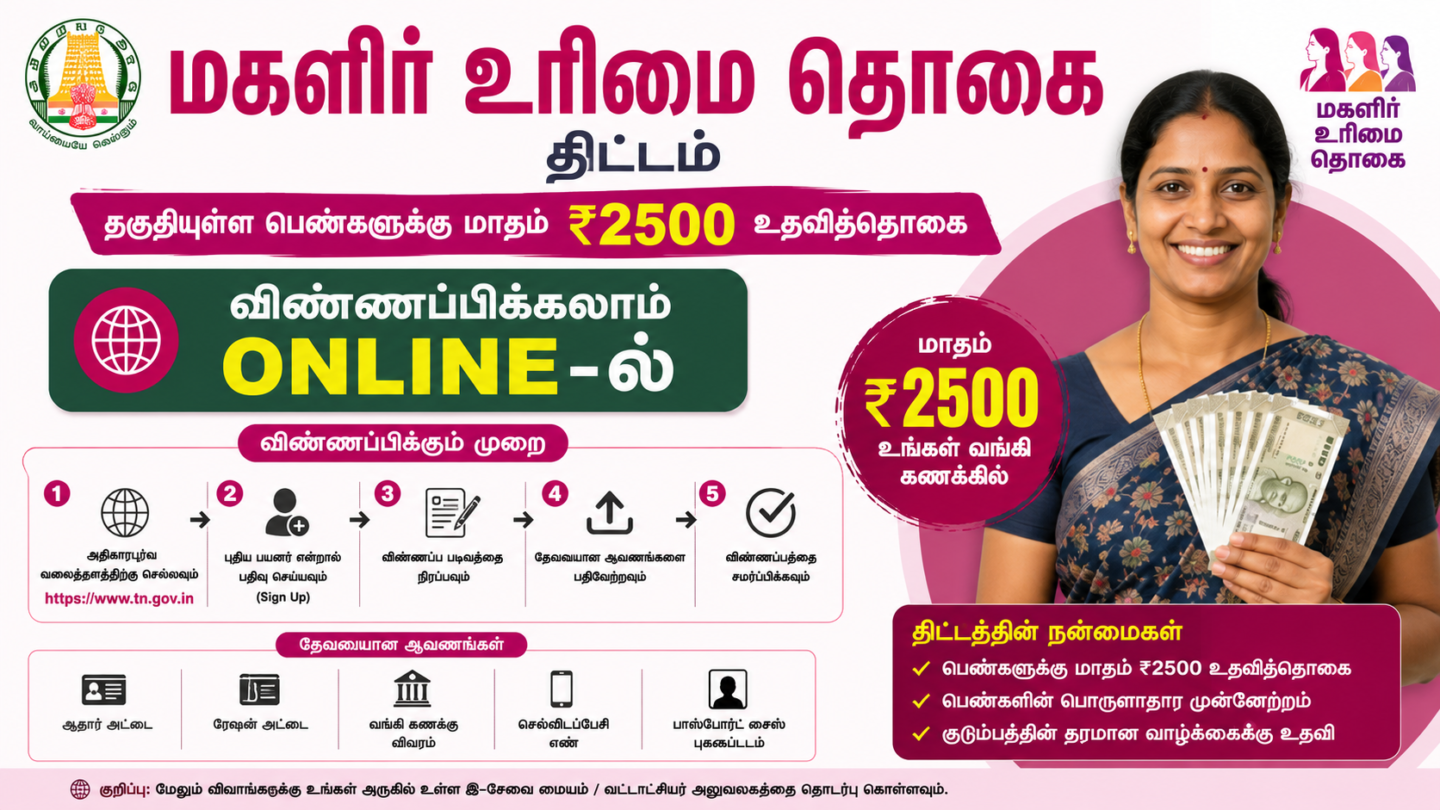

If you are looking to apply online for Magalir Urimai Thogai ₹2,500, this guide covers every step. The Tamil Nadu TVK Government has enhanced the monthly women’s assistance to ₹2,500 per month under the new scheme. Every eligible household now receives ₹30,000 per year, credited directly to the woman’s bank account. To apply, visit cmhelpline.tn.gov.in or call CM Helpline 14417. Here is everything you need.
Quick Answer: The Madhippumigu Magalir Thittam provides ₹2,500 per month to eligible women in Tamil Nadu via DBT. Apply at cmhelpline.tn.gov.in. Documents: Aadhaar, ration card, bank passbook, and electricity bill. Call CM Helpline 14417 for help. Eligibility: annual family income below ₹2.5 lakh, no government employee in family.
In This Article:
- 1. What Is the Magalir Urimai Thogai ₹2,500 Scheme?
- 2. Who Is Eligible: Conditions You Must Meet
- 3. How to Apply Online: Complete Process
- 4. Documents Required: Complete Checklist
- 5. How to Apply via CM Helpline 14417
- 6. District Guide: Chennai, Coimbatore, Madurai
- 7. Common Problems and Solutions
- Frequently Asked Questions
1. What Is the Magalir Urimai Thogai ₹2,500 Scheme?
The Madhippumigu Magalir Thittam is the Tamil Nadu TVK Government’s flagship women welfare scheme. It provides ₹2,500 per month directly to eligible women via Direct Benefit Transfer. This scheme replaced the earlier ₹1,000 monthly Kalaignar Magalir Urimai Thogai scheme, giving qualifying households ₹30,000 in yearly financial support. Applications go through cmhelpline.tn.gov.in.
| Scheme Detail | Official Information |
|---|---|
| Scheme Name | Madhippumigu Magalir Thittam |
| Monthly Amount | ₹2,500 per month |
| Annual Benefit | ₹30,000 per year |
| Government | Tamil Nadu TVK Government, 2026 |
| Application Portal | cmhelpline.tn.gov.in |
| CM Helpline Number | 14417 |
| Payment Method | Direct Benefit Transfer |
| Previous Scheme | Kalaignar Magalir Urimai Thogai, ₹1,000 per month |
Here’s the thing about this scheme. It was not built from scratch. The TVK Government enhanced the existing Kalaignar Magalir Urimai Thogai programme, which had already reached about 1.31 crore women across Tamil Nadu. The core goal stayed the same: give women heads of household direct financial support without middlemen or queue systems.
What changed is the amount. The earlier Magalir Urimai Thogai scheme paid ₹1,000 per month. The new TVK government women scheme pays ₹2,500 per month. That is a 150 percent increase in monthly support. For many households, this extra amount covers school fees, medical expenses, or essential groceries each month.
The scheme also changed its application process. The earlier programme used a separate portal at kmut.tn.gov.in. The new scheme runs through the central cmhelpline.tn.gov.in petition system. If you were already enrolled in the old scheme, your transition to the enhanced amount may happen automatically. New applicants and those not yet enrolled must submit a fresh petition at the CM Helpline portal.
The ₹2,500 payment reaches beneficiaries directly through Direct Benefit Transfer. This means the money goes from the government’s account straight into the woman’s bank account. No cash distribution centres. No commission deductions. The full ₹2,500 arrives intact, typically on a fixed monthly cycle.
2. Who Is Eligible: Conditions You Must Meet
This is where things get tricky. The ₹2,500 per month women welfare scheme Tamil Nadu has four conditions. You must meet all four at the same time. Passing three out of four is not enough. Missing even one condition leads to automatic rejection.
- Annual family income: must be below ₹2.5 lakh
- Land ownership: your family must own less than 5 acres of agricultural land
- Electricity consumption: annual household usage must be below 3,600 units
- Employment: no family member should hold a government job
Warning: If any family member works in a government job, the entire household becomes ineligible. This includes Central Government, State Government, and Public Sector Undertaking positions. Even contractual or temporary government employment may affect eligibility. Verify your family’s employment status carefully before applying.
Let me break this down for each condition so you know exactly what is being checked.
Income Condition: What Counts as Family Income?
Your total household income from all sources must stay below ₹2.5 lakh per year. This includes income from farming, small businesses, daily wages, and any other earnings. The ₹2.5 lakh figure is the combined annual income of all family members. If your family earns above this threshold in total, you do not qualify.
The income check is done through cross-referencing government databases. You do not need to submit a separate income certificate for the initial application. However, if your application is selected for verification, you may need an income certificate from your Ward Officer or Revenue Department. Keep this document ready as a precaution.
Land Condition: How Is the 5-Acre Limit Calculated?
Your family must own less than 5 acres of agricultural land in total. This limit counts all agricultural land registered under any family member’s name. If land is spread across different taluks or districts, the combined total is checked. Non-agricultural urban plots are assessed differently. Check your land records at your local Sub-Registrar Office if you are unsure of your total land holding.
Electricity Condition: Why 3,600 Units Per Year?
The 3,600 units annual limit works out to approximately 300 units per month. This figure is used as a practical proxy for measuring household income level. Families with higher electricity consumption are generally considered to have higher living standards. The Tamil Nadu government uses this data directly from TANGEDCO records, so you cannot manipulate this figure manually.
This approach was introduced to make eligibility checks faster and more objective. Instead of verifying every income claim manually, the electricity usage data gives officials a reliable indicator. If your family’s electricity usage is close to the 3,600 unit limit, gather your bills from the past 12 months and calculate your actual total before you apply.
Employment Condition: Who Counts as a Government Employee?
Any permanent, regular, or confirmed government employee in your family makes the household ineligible. This covers all levels: Central Government, State Government, and Public Sector Undertaking workers. Retired government employees are generally exempt from this restriction. Women working on contract or daily wage for government schemes should check their employment category carefully before applying.
For clarity on your specific situation, call CM Helpline 14417 and describe your family’s employment status. The helpline operators can confirm eligibility for complex household situations. You can also visit your nearest Common Service Centre for a face-to-face eligibility check at no cost.
| Eligibility Condition | Requirement | How to Verify |
|---|---|---|
| Annual Income | Below ₹2.5 lakh | Income certificate from Ward Office if requested |
| Land Ownership | Less than 5 acres total | Land records or patta document from Sub-Registrar |
| Electricity Usage | Below 3,600 units per year | TANGEDCO bills from the past 12 months |
| Government Employment | No family member in government job | Self-declaration confirmed during application review |
3. How to Apply Online: Complete Process
Here’s exactly what to do next. The entire application runs through the CM Helpline portal at cmhelpline.tn.gov.in. Follow these steps in order and keep your documents ready before you begin. The process takes about 15 minutes if you have everything prepared.
- Open cmhelpline.tn.gov.in in your mobile browser or on a computer
- Enter your registered mobile number on the login screen
- Enter the OTP that arrives on your mobile within 60 seconds
- Once logged in, click on the “Petition” option on the dashboard
- Fill in your name, address, gender as Female, and your 12-digit Aadhaar number
- In the petition text box, clearly write that you are applying for the women welfare scheme and state the scheme name
- Upload all four documents combined as one PDF file, under 50MB total size
- Submit the petition and write down your Grievance Number immediately
Pro Tip: Combine all four documents into a single PDF before starting the application. Free tools like iLovePDF or Smallpdf work on any mobile phone. One merged PDF under 50MB ensures the upload step goes through without errors on the first try.
Steps 1 and 2: Accessing the Portal
The portal at cmhelpline.tn.gov.in is the Tamil Nadu government’s central gateway for scheme applications and grievances. You do not need to create a new account. Your mobile number is your login ID. The OTP method is the only way to log in, so your phone must be active and receiving SMS messages when you start.
Use the same mobile number that is linked to your Aadhaar card when you log in. This is not a strict technical requirement at the login step, but it helps avoid mismatches during the eKYC verification that follows approval. Many delays happen because the application mobile number and the Aadhaar-linked number are different.
Steps 3 and 4: Filling the Petition Form
After logging in, click on “Petition” from the dashboard. This is the standard petition submission form for all CM Helpline requests. For this women’s scheme application, you use the same form. Fill in all fields accurately.
Your address must match what is on your Ration Card. Even minor differences like “Street” versus “St” can cause delays during address verification. Type your address exactly as it appears on your ration card. For the gender field, select “Female” since this scheme is exclusively for women heads of household.
Step 5: Writing the Petition Text Clearly
The petition text box is where many applications go wrong. You must state your request clearly. Write that you are applying for the Tamil Nadu TVK Government women welfare scheme. Mention that you are the head of your household and that you meet all four eligibility conditions. A clear petition text moves through the review process faster.
Missing this step causes most rejections at the preliminary review stage. A vague or blank petition text gets marked as an incomplete application. Be specific and keep it under 200 words. Reviewers go through many applications daily. A well-written petition immediately tells them what action to take.
Steps 6 and 7: Document Upload
The portal accepts only one file per petition. This is why you must merge all four documents into a single PDF before uploading. The size limit is 50MB. Most merged document PDFs fall between 2MB and 15MB, well within the limit.
Scan each document so all text is clearly visible. Blurry or dark scans fail the document verification step. Include both front and back pages of your Aadhaar card. For the bank passbook, include the page that shows your account number, IFSC code, and your name.
Step 8: Your Grievance Number Is Your Application ID
After successful submission, the portal displays a Grievance Number. This is the most important piece of information in the entire process. Write it down immediately. Take a screenshot. You will need it to track your application status later.
Processing typically takes 30 to 60 days depending on your district and application volume. You can check your status at cmhelpline.tn.gov.in at any time using your Grievance Number. That’s basically it for the online submission step.
4. Documents Required: Complete Checklist
You need four documents to apply for the ₹2,500 per month women welfare scheme Tamil Nadu. All four are mandatory. No document can be skipped. Submitting even three out of four will result in rejection at the document verification stage.
- Aadhaar Card: Must be linked to your active mobile number
- Ration Card: Must be linked to your Aadhaar number
- Bank Passbook: Must be a DBT enabled savings account
- Electricity Bill: The most recent month’s bill from TANGEDCO
| Document | Why It Is Needed | How to Prepare It |
|---|---|---|
| Aadhaar Card | Identity verification and eKYC confirmation | Link mobile number at uidai.gov.in if not already done |
| Ration Card | Confirms household eligibility and family details | Link to Aadhaar at your nearest Fair Price Shop |
| Bank Passbook | Account details for Direct Benefit Transfer payment | Activate DBT at your bank branch or via net banking |
| Electricity Bill | Verifies income level through annual consumption data | Use the most recent TANGEDCO bill available |
Aadhaar Card: The Foundation of Your Application
Your Aadhaar card is the most critical document in this process. The entire application ties to your 12-digit Aadhaar number. The eKYC verification step that happens after approval confirms that your Aadhaar name matches your bank account name exactly. Any mismatch at this stage causes payment failure even after approval.
To check if your mobile number is linked to your Aadhaar, visit uidai.gov.in. Navigate to the “Check Aadhaar Status” section and verify your mobile link. If the link is missing, visit your nearest Aadhaar Enrollment Centre for an update. Mobile number updates at Aadhaar centres typically take 7 to 10 working days to reflect in the system.
Ration Card: Your Household’s Identity in the System
The ration card confirms that you are the woman head of your household in the Tamil Nadu Public Distribution System. It also establishes your family’s income category through your ration card colour. For this scheme, your ration card must already be linked to your Aadhaar number. If this link is missing, the scheme database cannot verify your household details.
Visit your nearest Public Distribution System outlet or Fair Price Shop to link your ration card to Aadhaar. The process takes about 15 minutes. Bring your original Aadhaar card and ration card. The shop operator initiates the linking request. Confirmation typically arrives within 3 to 5 working days.
Bank Passbook: How to Confirm DBT Readiness
The bank account you register must be capable of receiving Direct Benefit Transfer payments. Most nationalised and major private bank accounts in India are already DBT ready. Call your bank’s customer care number or visit your branch to confirm your account’s DBT status. If your account is not linked for DBT, the branch can activate it within one working day.
Oh, and one more thing. The name on your bank account must exactly match the name on your Aadhaar card. Not approximately. Exactly. A single letter or initial difference will cause the payment transfer to fail. If your names differ, contact your bank or Aadhaar centre to correct the mismatch before you submit your application.
Electricity Bill: The Usage Verification Document
Use the most recent electricity bill from TANGEDCO, Tamil Nadu’s electricity board. The bill shows your Consumer Number, service address, and units consumed. The application reviewer uses your Consumer Number to pull your annual usage data directly from TANGEDCO records. You do not need to submit 12 months of bills. One recent bill that shows your Consumer Number is sufficient.
5. How to Apply via CM Helpline 14417
Not everyone is comfortable with the online portal process. The CM Helpline 14417 offers a direct phone route to apply for and get information about the ₹2,500 per month scheme. This helpline is operated by the Tamil Nadu TVK Government and handles scheme applications alongside general grievances.
New Updates

To apply via phone, call 14417. An operator will guide you through the process in Tamil or English. Have your Aadhaar number, ration card number, and bank account details ready before calling. A typical assisted application call takes about 10 to 20 minutes depending on the complexity of your situation.
The helpline is also the right place to call in these situations. First, if your online application shows an error and you cannot proceed. Second, if you submitted a petition but did not receive a Grievance Number. Third, if your application status shows “Rejected” and you want to know the exact reason before reapplying.
You can also visit a Common Service Centre in your area for in-person assistance. The operator there will help you complete the online application. Bring all original documents and one set of photocopies. Most centres complete the submission within a single visit. There is usually no charge for this service at government-authorised Common Service Centres.
After Applying: What Happens Next?
After submission, district-level officials review your petition. They cross-check your details against the Aadhaar database, ration card records, land registry data, and TANGEDCO usage figures. Most of this verification is automated. Applications where all four conditions are clearly met move through faster.
If verification is successful, your application reaches the approval stage. You receive an SMS on your registered mobile number. The first payment typically arrives within 60 to 90 days of approval. Always check the latest timeline at cmhelpline.tn.gov.in, as processing times may vary by district and application volume.
If your application needs additional verification, a district Social Welfare Officer may contact you for more documents. Respond promptly to these requests. Delays in responding to verification requests slow down the approval process significantly.
6. District Guide: Chennai, Coimbatore, Madurai
Women across all 38 districts of Tamil Nadu can apply for the TVK government women scheme. The online application process is identical statewide. However, local support resources and in-person assistance availability may differ by district. The following section covers the three highest-population districts.
“Eligible women will receive their monthly assistance of ₹2,500 directly to their bank accounts through Direct Benefit Transfer,” according to the Tamil Nadu TVK Government welfare programme announcement, 2026.
Chennai: Applying in the Capital District
Women in Chennai can apply through cmhelpline.tn.gov.in or by calling CM Helpline 14417. The Greater Chennai Corporation area has multiple Common Service Centres across all zones. Look for CSC centres near your local ward office for the most convenient in-person help. Chennai applicants generally experience faster digital processing given the high digital infrastructure coverage in the district.
Coimbatore: Applying in the Western District
Women in Coimbatore district can use the same cmhelpline.tn.gov.in portal. Coimbatore has a large population of small industry workers and agricultural labourers. Women in these households often qualify under all four eligibility conditions. For Coimbatore-specific help with your application, call CM Helpline 14417. The Coimbatore District Collectorate Social Welfare wing also provides in-person guidance.
Madurai: Applying in the Southern District
Women in Madurai can apply at cmhelpline.tn.gov.in or visit the Madurai Collectorate’s Social Welfare Department. Madurai district includes many rural taluks with large agricultural populations. Most households in these areas fall within the land and income eligibility limits. For local help, visit the nearest block-level Social Welfare Office in your taluk.
For all other districts including Salem, Tirunelveli, Vellore, Erode, and Tiruchirappalli, the process remains the same. Apply at cmhelpline.tn.gov.in or call CM Helpline 14417. For district-specific contacts and local welfare office addresses, check the official portal directly. All 38 Tamil Nadu districts are covered under this scheme.
7. Common Problems and Solutions
Sound familiar? You’ve done everything right, but something is not working. Most problems in the application process come from just a handful of causes. This comes up all the time. Here are the five most common issues and exactly what to do about each one.
Problem 1: Portal Login Not Working
If you cannot log in to cmhelpline.tn.gov.in, first check that your mobile number is active and receiving SMS messages. The OTP sent during login expires in 5 minutes. If you do not receive an OTP after 2 minutes, click “Resend OTP.” Portal traffic is highest on weekday mornings between 9am and 11am. Applying in the evening or on weekends usually gives a smoother experience.
Problem 2: Document Upload Fails
Upload failures happen when the PDF is too large or in the wrong format. The portal accepts only PDF files below 50MB. If your combined document file is larger, use iLovePDF or Smallpdf to compress it. Both tools work free on any mobile browser. After compression, retry the upload.
If the upload consistently fails on your mobile phone, try a desktop or laptop computer. Desktop browsers handle large file uploads more reliably on the CM Helpline portal. A public computer at your nearest library or Common Service Centre will work perfectly for this step.
Problem 3: Application Status Shows Rejected
Rejection does not mean permanent disqualification. Most rejections come from one of two issues. First, the name on the Aadhaar card does not exactly match the name on the bank passbook. Second, the petition text did not clearly mention which scheme the application was for. Both are fixable.
Here is a situation that shows how this plays out. A woman in Madurai named Kavitha submitted her application with her Aadhaar showing “K. Kavitha” and her bank passbook showing “Kavitha K.” Functionally the same name, but the automated system flagged it as a mismatch. Her application was rejected at the document verification stage. She visited her bank branch, submitted a name correction request with her original Aadhaar card and a utility bill as proof. The bank updated the name within 5 working days. She resubmitted her petition on cmhelpline.tn.gov.in and was approved within 45 days. The total time from rejection to approval was about 3 weeks.
Problem 4: Approved but No Payment Received
If your status shows “Approved” but no money has arrived in your account, check two things first. One, confirm your bank account is currently DBT enabled by calling your bank’s customer care. Two, check if your bank account has been inactive. Accounts with no transactions in the past 12 months are often frozen by banks automatically.
Visit your bank branch to reactivate an inactive account. Make one small transaction in the account after reactivation. Once the account is active, the next payment cycle should include your arrears. Call CM Helpline 14417 to report the issue if payments do not resume within 30 days of account reactivation.
Problem 5: eKYC Verification Fails Repeatedly
eKYC failure is one of the top reasons for payment delays in this Magalir Urimai Thogai application process. The most common cause is that your mobile number is not linked to your Aadhaar. Visit your nearest Aadhaar Enrollment Centre and request a mobile number update. This update takes 7 to 10 working days to reflect.
An alternative is biometric-based eKYC verification. Some government service centres offer fingerprint-based verification for applicants whose mobile number link is outdated or inactive. Contact your district Social Welfare Office for information on this offline eKYC method. This alternative is especially useful for older beneficiaries who have changed their mobile number.
Frequently Asked Questions
1. What is the Magalir Urimai Thogai ₹2,500 scheme?
The ₹2,500 scheme is the Madhippumigu Magalir Thittam, launched by the Tamil Nadu TVK Government. It is the enhanced version of the earlier Kalaignar Magalir Urimai Thogai scheme, which paid ₹1,000 per month. The new scheme provides ₹2,500 per month, totalling ₹30,000 per year, deposited directly to the beneficiary’s bank account via Direct Benefit Transfer.
2. How do I apply online for Magalir Urimai Thogai ₹2,500?
Visit cmhelpline.tn.gov.in, log in with your mobile number and OTP, click “Petition,” and fill the form with your name, address, and 12-digit Aadhaar number. Write clearly that you are applying for the women welfare scheme. Upload all four documents as one PDF under 50MB. Submit and save your Grievance Number. You can also call CM Helpline 14417 for assisted application.
3. Who is eligible for the Magalir Urimai Thogai ₹2,500 per month?
Eligibility requires all four conditions: annual family income below ₹2.5 lakh, less than 5 acres of agricultural land, annual electricity usage below 3,600 units, and no government employee in the family. All four must be met simultaneously. The woman applying must be the head of her household.
4. What documents are needed for the ₹2,500 women scheme application?
You need four documents: Aadhaar Card, Ration Card, Bank Passbook, and a recent Electricity Bill. All four must be combined into one PDF file for upload. The Aadhaar must be linked to your mobile number. The bank account must be DBT enabled. The ration card must already be linked to your Aadhaar number.
5. Is this the same as the old Kalaignar Magalir Urimai Thogai scheme?
They are related but separate programmes. The earlier Kalaignar Magalir Urimai Thogai paid ₹1,000 per month through kmut.tn.gov.in. The new TVK government scheme provides ₹2,500 per month and applications go through cmhelpline.tn.gov.in. Existing beneficiaries of the old scheme are being transitioned to the enhanced amount. New applicants must submit a fresh petition at the CM Helpline portal.
6. How long does it take to receive the first payment?
Eligible applicants typically receive the first payment within 60 to 90 days after approval. Processing time depends on your district’s application volume and the accuracy of your submitted documents. Applications with all documents correctly matched generally move faster. Always verify the current processing timeline at cmhelpline.tn.gov.in, as timelines may change.
7. What if my application is rejected? Can I reapply?
Yes, you can reapply after fixing the issue that caused the rejection. The most common rejection reasons are name mismatches between Aadhaar and bank passbook, incomplete document uploads, and unclear petition text. Call CM Helpline 14417 to find out the specific rejection reason for your application. Correct the problem and resubmit through cmhelpline.tn.gov.in.
8. Can I check my application status online?
Yes. Visit cmhelpline.tn.gov.in, log in with your mobile number, and use your Grievance Number to track your petition status. Status displays as Pending, Under Review, Approved, or Rejected. For the most current and accurate status, check the portal directly or call CM Helpline 14417. Keep your Grievance Number safe as it is your only way to track progress.
9. What if my Aadhaar name does not match my bank account name?
A name mismatch is one of the most common causes of payment failure even after approval. Visit your bank branch with your original Aadhaar card and a recent utility bill as proof of identity. Request a name correction so the bank account name matches the Aadhaar name exactly. This process typically takes 5 to 7 working days. Once corrected, your DBT payments will resume in the next payment cycle.
10. Is there an age limit to apply for this women’s scheme?
The scheme is open to women who are heads of their households and meet all four eligibility conditions. Women aged 60 and above may be transitioned to the Old Age Pension scheme, which provides a separate and higher monthly payment. For exact age-based conditions and current eligibility rules, check cmhelpline.tn.gov.in or call CM Helpline 14417 for the most up-to-date information.
Apply here: cmhelpline.tn.gov.in, Official CM Helpline Portal
Your Path to ₹2,500 Per Month: Next Steps
You now know exactly how the Magalir Urimai Thogai ₹2,500 scheme works, who qualifies, what documents you need, and what to do when problems come up.
You have everything you need to complete your application today. The required documents are things you already have at home. The portal process takes about 15 minutes from login to submission.
Your specific next step: Open cmhelpline.tn.gov.in right now. Log in with your mobile OTP. Fill the petition form with your Aadhaar details. Write your scheme application request clearly in the petition text. Upload your four merged documents as one PDF. Save your Grievance Number after submission.
For help at any step, call CM Helpline 14417. Assistance is available in both Tamil and English. For a detailed guide on checking your application status, see our Application Status Check Guide.
Disclaimer: This article provides general information based on publicly available government sources. Eligibility conditions, application procedures, and payment amounts may change. Always verify the current details at cmhelpline.tn.gov.in before applying. This website is not affiliated with the Tamil Nadu Government.
Last Reviewed: June 2026. Information verified against cmhelpline.tn.gov.in official notifications. Scheme details may change. Always verify current eligibility and application procedures at cmhelpline.tn.gov.in or by calling CM Helpline 14417.
Sources: cmhelpline.tn.gov.in and tnpds.gov.in official Tamil Nadu government portals. Always verify current information at cmhelpline.tn.gov.in.